
Data Access Object
Also Known As DAO
Brief Description
Code that depends on specific features of data resources ties together business logic with data access logic. This makes it difficult to replace or modify an application's data resources.
The Data Access Object (or DAO) pattern:
- separates a data resource's client interface from its data access mechanisms
- adapts a specific data resource's access API to a generic client interface
The DAO pattern allows data access mechanisms to change independently of the code that uses the data.
Detailed Description
See the Core J2EE TM Patterns
Detailed Example
The Java Pet Store sample application uses the DAO pattern both for database vendor-neutral data access, and to represent XML data sources as objects.
- Accessing a database with a DAO.
A Data Access Object class can provide access to a particular data resource without coupling the resource's API to the business logic. For example, sample application classes access catalog categories, products, and items using DAO interface
CatalogDAO.Reimplementing
CatalogDAOfor a different data access mechanism (to use a Connector, for example), would have little or no impact on any classes that useCatalogDAO, because only the implementation would change. Each potential alternate implementation ofCatalogDAOwould access data for the items in the catalog in its own way, while presenting the same API to the class that uses it.The following code excerpts illustrate how the sample application uses the DAO pattern to separate business logic from data resource access mechanisms:
- Interface
CatalogDAOdefines the DAO API. Notice that the methods in the interface below make no reference to a specific data access mechanism. For example, none of the methods specify an SQL query, and they throw only exceptions of typeCatalogDAOSysException. Avoiding mechanism-specific information in the DAO interface, including exceptions thrown, is essential for hiding implementation details.public interface CatalogDAO { public Category getCategory(String categoryID, Locale l) throws CatalogDAOSysException; public Page getCategories(int start, int count, Locale l) throws CatalogDAOSysException; public Product getProduct(String productID, Locale l) throws CatalogDAOSysException; public Page getProducts(String categoryID, int start, int count, Locale l) throws CatalogDAOSysException; public Item getItem(String itemID, Locale l) throws CatalogDAOSysException; public Page getItems(String productID, int start, int size, Locale l) throws CatalogDAOSysException; public Page searchItems(String query, int start, int size, Locale l) throws CatalogDAOSysException; } - Class
CloudscapeCatalogDAOimplements this interface for the Cloudscape relational database, as shown in the following code excerpt. Note that the SQL to access the Cloudscape database is hard-coded.public class CloudscapeCatalogDAO implements CatalogDAO { ... public static String GET_CATEGORY_STATEMENT = "select name, descn " + " from (category a join category_details b on a.catid=b.catid) " + " where locale = ? and a.catid = ?"; ... public Category getCategory(String categoryID, Locale l) throws CatalogDAOSysException { Connection c = null; PreparedStatement ps = null; ResultSet rs = null; Category ret = null; try { c = getDataSource().getConnection(); ps = c.prepareStatement(GET_CATEGORY_STATEMENT,ResultSet.TYPE_SCROLL_INSENSITIVE,ResultSet.CONCUR_READ_ONLY); ps.setString(1, l.toString()); ps.setString(2, categoryID); rs = ps.executeQuery(); if (rs.first()) { ret = new Category(categoryID, rs.getString(1), rs.getString(2)); } rs.close(); ps.close(); c.close(); return ret; } catch (SQLException se) { throw new CatalogDAOSysException("SQLException: " + se.getMessage()); } } ... }
- Interface
- Implementation strategies. Designing a DAO interface and implementation is a tradeoff between simplicity and flexibility. The sample application provides examples of several strategies for implementing the Data Access Object pattern.
- Implement the interface directly as a class. The simplest (but least flexible) way to implement a data access object is to write it as a class. Class
ScreenDefinitionsDAO, described below and shown in Figure 1 above, is an example of a class that directly implements a DAO interface. This approach separates the data access interface from the details of how it is implemented, providing the benefits of the DAO pattern. The data access mechanism can be changed easily by writing a new class that implements the same interface, and changing client code to use the new class. Yet this approach is inflexible because it requires a code changes to modify the data access mechanism. - Improve flexibility by making DAOs "pluggable". A pluggable DAO allows an application developer or deployer to select a data access mechanism with no changes to program code. In this approach, the developer accesses a data source only in terms of an abstract DAO interface. Each DAO interface has one or more concrete classes that implement that interface for a particular type of data source. The application uses a factory object to select the DAO implementation at runtime, based on configuration information.
For example, the sample application uses factory class
CatalogDAOFactoryto select the class that implements the DAO interface for the catalog. Figure 2 below presents a structure diagram of the Data Access Object design pattern using a factory to select a DAO implementation.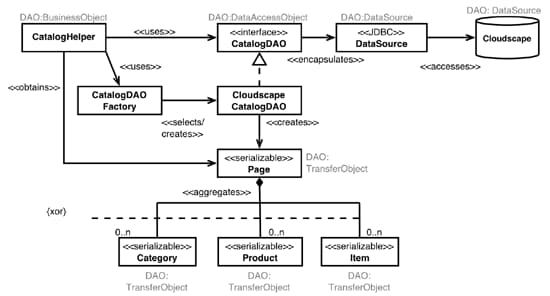
Figure 2. A pluggable DAO
At runtime, the
CatalogHelperuses theCatalogDAOFactoryto create an object that implementsCatalogDAO. The factory looks up the name of the class that implements the DAO interface in environment entry "param/CatalogDAOClass". TheCatalogHelperaccesses the catalog data source exclusively using the object created by the factory. In the example shown in the figure, the environment entry was set to the (fully-specified) name of classCloudscapeCatalogDAO. This class implements the catalog DAO interface in terms of JDBC TM data sources, accessing a Cloudscape relational database.This approach is more flexible than using a hard-coded class. To add a new type of data source, an application developer would simply create a class that implements
CatalogDAOin terms of the new data source type, specify the implementing class's name in the environment entry, and re-deploy. The factory would create an instance of the new DAO class, and the application would use the new data source type. - Reduce redundancy by externalizing SQL. Writing a separate class for data source types that have similar APIs can create a great deal of redundant code. For example, JDBC data sources differ from one another primarily in the SQL used to access them. The only differences between the Cloudscape DAO described above and the DAO for a different SQL database are the connection string and the SQL used to access the database.
The sample application reduces redundant code by using a "generic DAO" that externalizes the SQL for different JDBC data sources. Figure 3 below shows how the sample application uses an XML file to specify the SQL for different JDBC data sources.
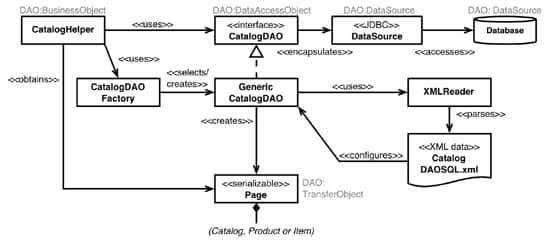
Figure 3. Externalizing DAO SQL
In the figure, the
CatalogDAOFactoryhas selected an object of typeGenericCatalogDAOas the DAO to access the catalog. An XML file calledCatalogDAOSQL.xmlspecifies the SQL for each supported operation on each type of database.GenericCatalogDAOconfigures itself by selecting a group of SQL statements from the XML file that correspond to the database type named by environment entry "param/CatalogDAODatabase". The code sample below shows the definition of the XML for thegetCategoryoperation of theCatalogDAO. Different SQL is specified for "cloudscape" and "oracle" database types.<DAOConfiguration> <DAOStatements database="cloudscape"> <SQLStatement method="GET_CATEGORY"> <SQLFragment parameterNb="2"> select name, descn from (category a join category_details b on a.catid=b.catid) where locale = ? and a.catid = ? </SQLFragment> </SQLStatement> ... <DAOStatements database="oracle"> <SQLStatement method="GET_CATEGORY"> <SQLFragment parameterNb="2"> select name, descn from category a, category_details b where a.catid = b.catid and locale = ? and a.catid = ? </SQLFragment> </SQLStatement> ... </DAOConfiguration>Method
GenericCatalogDAO.getCategorychooses the SQL corresponding to the configured database type, and uses it to fetch a category from the database via JDBC. The following code excerpt shows shows the implementation of the method.public Category getCategory(String categoryID, Locale locale) throws CatalogDAOSysException { Connection connection = null; ResultSet resultSet = null; PreparedStatement statement = null; try { connection = getDataSource().getConnection(); String[] parameterValues = new String[] { locale.toString(), categoryID }; statement = buildSQLStatement(connection, sqlStatements, XML_GET_CATEGORY, parameterValues); resultSet = statement.executeQuery(); if (resultSet.first()) { return new Category(categoryID, resultSet.getString(1), resultSet.getString(2)); } return null; } catch (SQLException exception) { throw new CatalogDAOSysException("SQLException: " + exception.getMessage()); } finally { closeAll(connection, statement, resultSet); } }Notice that the method catches any possible
SQLExceptionand converts it to aCatalogDAOSysException, hiding the implementation detail that the DAO uses a JDBC database.This strategy supports multiple JDBC databases with a single DAO class. It both decreases redundant code, and makes new database types easier to add. To support a new database type, a developer simply adds the SQL statements for that database type to the XML file, updates the environment entry to use the new type, and redeploys.
The pluggable DAO and generic DAO strategies can be used separately. If you know that a DAO class will only ever use JDBC databases (for example), the generic DAO class can be hardwired into the application, instead of selected by a factory. For maximum flexibility, the sample application uses both a factory method and a generic DAO.
- Implement the interface directly as a class. The simplest (but least flexible) way to implement a data access object is to write it as a class. Class
- Encapsulating non-database data resources as DAO classes.
A data access object can represent data that is not stored in a database. The sample application uses the DAO pattern to represent XML data sources as objects. Sample application screens are defined in an XML file which is interpreted by the class
ScreenDefinitionDAO. Specifying screen definitions externally makes access to the screen definitions more flexible. For example, if the application designers (or maintainers) decide to change the application to store screen descriptions in the database, instead of in an XML file, they would need only to implement a single new class (ScreenFlowCloudscapeDAO, for example). The code that usesScreenDefinitionDAOwould remain unchanged, but the data would come from the database via the new class.The screen definitions mechanism in the sample application provides an example of a concrete Data Access Object representing an underlying, non-database resource (an XML file).
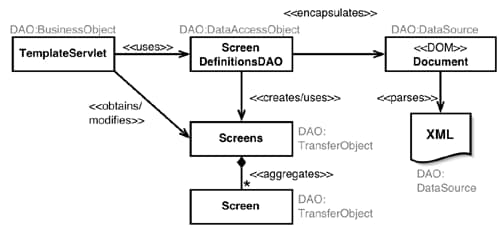
Figure 1. Data Access Object providing access to XML data source
Figure 1 shows a structure diagram of the
ScreenDefinitionDAOmanaging the loading and interpretation of XML data that defines application screens.TemplateServletuses theScreenDefinitionDAOto load screen definitions:Screens screenDefinitions = ScreenDefinitionDAO.loadScreenDefinitions(screenDefinitionURL);ScreenDefinitionDAOrepresents screen definitions in an XML file deployed with an application. It uses XML APIs to read the screen definitions from the XML file. Only this class would need to be replaced to support storing screen definitions in some other way. The method that loads screen definitions looks like this:public static Screens loadScreenDefinitions(URL location) { Element root = loadDocument(location); if (root != null) return getScreens(root); else return null; } ... public static Screens getScreens(Element root) { // get the template String defaultTemplate = getTagValue(root, DEFAULT_TEMPLATE); if (defaultTemplate == null) { System.err.println("*** ScreenDefinitionDAO error: " + " Default Template not Defined."); return null; } Screens screens = new Screens(defaultTemplate); getTemplates(root, screens); // get screens NodeList list = root.getElementsByTagName(SCREEN); for (int loop = 0; loop < list.getLength(); loop++) { Node node = list.item(loop); if ((node != null) && node instanceof Element) { String templateName = ((Element)node).getAttribute(TEMPLATE); String screenName = ((Element)node).getAttribute(NAME); HashMap parameters = getParameters(node); Screen screen = new Screen(screenName, templateName, parameters); if (!screens.containsScreen(screenName)) { screens.addScreen(screenName, screen); } else { System.err.println("*** Non Fatal errror: Screen " + screenName + " defined more than once in screen definitions file"); } } } return screens; } ...The code fragment above shows how
loadScreenDefinitionsloads screen definitions using DOM interfaces, while hiding that fact from clients of the class. A client of this class can expect to receive aScreensobject regardless of how those screens are loaded from persistent storage. MethodgetScreenshandles all of the DOM-specific details of loading a screen from an XML file.