
Technical Article
Asynchronous JavaScript Technology and XML (Ajax) With the Java Platform
By Greg Murray, June 9, 2005; updated October 2006
Anyone who has used Flickr, GMail, Google Suggest, or Google Maps will realize that a new breed of dynamic web applications is emerging. These applications look and act very similar to traditional desktop applications without relying on plug-ins or browser-specific features. Web applications have traditionally been a set ofaja HTML pages that must be reloaded to change any portion of the content. Technologies such as JavaScript programming language and cascading style sheets (CSS) have matured to the point where they can be used effectively to create very dynamic web applications that will work on all of the major browsers. This article will detail several techniques that you can use today to enable your web applications to be more rich and interactive like desktop applications.
Introducing Asynchronous JavaScript Technology and XML (Ajax)
Using JavaScript technology, an HTML page can asynchronously make calls to the server from which it was loaded and fetch content that may be formatted as XML documents, HTML content, plain text, or JavaScript Object Notation (JSON). The JavaScript technology may then use the content to update or modify the Document Object Model (DOM) of the HTML page. The term Asynchronous JavaScript Technology and XML (Ajax) has emerged recently to describe this interaction model.
Ajax is not new. These techniques have been available to developers targeting Internet Explorer on the Windows platform for many years. Until recently, the technology was known as web remoting or remote scripting. Web developers have also used a combination of plug-ins, Java applets, and hidden frames to emulate this interaction model for some time. What has changed recently is the inclusion of support for the XMLHttpRequest object in the JavaScript runtimes of the mainstream browsers. The real magic is the result of the JavaScript technology's XMLHttpRequest object. Although this object is not specified in the formal JavaScript technology specification, all of today's mainstream browsers support it. The subtle differences with the JavaScript technology and CSS support among current generation browsers such as Mozilla Firefox, Internet Explorer, and Safari are manageable. JavaScript libraries such as Dojo, Prototype, and the Yahoo User Interface Library have emerged to fill in where the browsers are not as manageable and to provide a standardized programming model. Dojo, for example, is addressing accessibility, internationalization, and advanced graphics across browsers -- all of which had been thorns in the side of earlier adopters of Ajax. More updates are sure to occur as the need arises.
What makes Ajax-based clients unique is that the client contains page-specific control logic embedded as JavaScript technology. The page interacts with the JavaScript technology based on events such as the loading of a document, a mouse click, focus changes, or even a timer. Ajax interactions allow for a clear separation of presentation logic from the data. An HTML page can pull in bite-size pieces to be displayed. Ajax will require a different server-side architecture to support this interaction model. Traditionally, server-side web applications have focused on generating HTML documents for every client event resulting in a call to the server. The clients would then refresh and re-render the complete HTML page for each response. Rich web applications focus on a client fetching an HTML document that acts as a template or container into which to inject content, based on client events using XML data retrieved from a server-side component.
Some uses for Ajax interactions are the following:
-
Real-time form data validation: Form data such as user IDs, serial numbers, postal codes, or even special coupon codes that require server-side validation can be validated in a form before the user submits a form.
-
Autocompletion: A specific portion of form data such as an email address, name, or city name may be autocompleted as the user types.
-
Load on demand: Based on a client event, an HTML page can fetch more data in the background, allowing the browser to load pages more quickly.
-
Sophisticated user interface controls and effects: Controls such as trees, menus, data tables, rich text editors, calendars, and progress bars allow for better user interaction and interaction with HTML pages, generally without requiring the user to reload the page.
-
Refreshing data and server push: HTML pages may poll data from a server for up-to-date data such as scores, stock quotes, weather, or application-specific data. A client may use Ajax techniques to get a set of current data without reloading a full page. Polling is not the most effecient means of ensuring that data on a page is the most current. Emerging techniques such as Comet are being developed to provide true server-side push over HTTP by keeping a persistent connection between the client and server. See this blog entry on Comet using Grizzly for more on the development of server push with Java technology.
-
Partial submit: An HTML page can submit form data as needed without requiring a full page refresh.
-
Mashups: An HTML page can obtain data using a server-side proxy or by including an external script to mix external data with your application's or your service's data. For example, you can mix content or data from a third-party application such as Google Maps with your own application.
-
Page as an application: Ajax techniques can be made to create single-page applications that look and feel much like a desktop application. See the article on the use of Ajax and portlets for more on how you can use portlet applications today.
Though not all-inclusive, this list shows that Ajax interactions allow web applications to do much more than they have done in the past.
Now that we have discussed what Ajax is and what some higher-level issues are, let's put all the pieces together and look at an Ajax-enabled Java application.
Let's consider an example. A web application contains a static HTML page, or an HTML page generated in JSP technology contains an HTML form that requires server-side logic to validate form data without refreshing the page. A server-side web component (servlet) named ValidateServlet will provide the validation logic. Figure 1 describes the details of the Ajax interaction that will provide the validation logic.
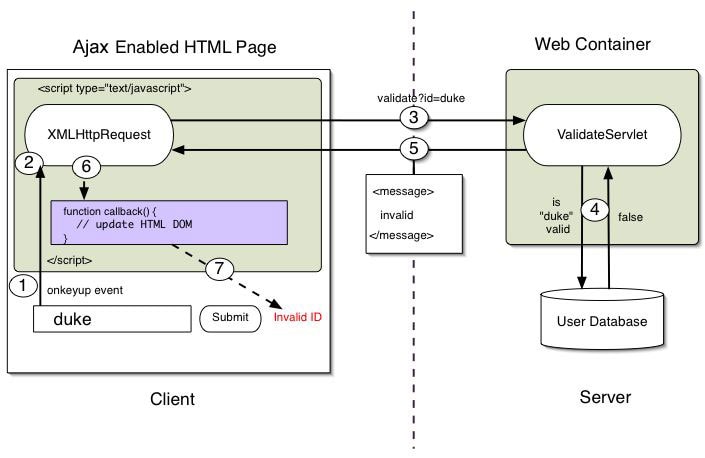
Figure 1: An Ajax Interaction Provides Validation Logic
The following items represent the setups of an Ajax interaction as they appear in Figure 1.
- A client event occurs.
- An
XMLHttpRequestobject is created and configured. - The
XMLHttpRequestobject makes a call. - The request is processed by the
ValidateServlet. - The
ValidateServletreturns an XML document containing the result. - The
XMLHttpRequestobject calls thecallback()function and processes the result. - The HTML DOM is updated.
Now let's look at each step of the Ajax interaction in more detail.
JavaScript technology functions are called as the result of an event. In this case, the function validate() may be mapped to a onkeyup event on a link or form component.
<input type="text"

            size="20"
              id="userid"
            name="id"
         onkeyup="validate();">
This form element will call the validate() function each time the user presses a key in the form field.
2. A XMLHttpRequest object is created and configured.
An XMLHttpRequest object is created and configured.
var req;


function validate() {
   var idField = document.getElementById("userid");
   var url = "validate?id=" + encodeURIComponent(idField.value);
   if (typeof XMLHttpRequest != "undefined") {
       req = new XMLHttpRequest();
   } else if (window.ActiveXObject) {
       req = new ActiveXObject("Microsoft.XMLHTTP");
   }
   req.open("GET", url, true);
   req.onreadystatechange = callback;
   req.send(null);
}
The validate() function creates an XMLHttpRequest object and calls the open function on the object. The open function requires three arguments: the HTTP method, which is GET or POST; the URL of the server-side component that the object will interact with; and a boolean indicating whether or not the call will be made asynchronously. The API is XMLHttpRequest.open(String method, String URL, boolean asynchronous). If an interaction is set as asynchronous ( true) a callback function must be specified. The callback function for this interaction is set with the statement req.onreadystatechange = callback;. See section 6 for more details.
3. The XMLHttpRequest object makes a call.
When the statement req.send(null); is reached, the call will be made. In the case of an HTTP GET, this content may be null or left blank. When this function is called on the XMLHttpRequest object, the call to the URL that was set during the configuration of the object is called. In the case of this example, the data that is posted ( id) is included as a URL parameter.
Use an HTTP GET when the request is idempotent, meaning that two duplicate requests will return the same results. When using the HTTP GET method, the length of URL, including escaped URL parameters, is limited by some browsers and by server-side web containers. The HTTP POST method should be used when sending data to the server that will affect the server-side application state. An HTTP POST requires a Content-Type header to be set on the XMLHttpRequest object by using the following statement:
req.setRequestHeader("Content-Type", "application/x-www-form-urlencoded");

req.send("id=" + encodeURIComponent(idTextField.value));
When sending form values from JavaScript technology, you should take into consideration the encoding of the field values. JavaScript technology includes an encodeURIComponent() function that should be used to ensure that localized content is encoded properly and that special characters are encoded correctly to be passed in an HTTP request.
4. The request is processed by the ValidateServlet.
A servlet mapped to the URI "validate" checks whether the user ID is in the user database.
A servlet processes an XMLHttpRequest just as it would any other HTTP request. The following example show a server extracting the id parameter from the request and validating whether the parameter has been taken.
public class ValidateServlet extends HttpServlet {


    private ServletContext context;
    private HashMap users = new HashMap();

    public void init(ServletConfig config) throws ServletException {
        super.init(config);
        this.context = config.getServletContext();
        users.put("greg","account data");
        users.put("duke","account data");
    }

    public void doGet(HttpServletRequest request, HttpServletResponse  response)
        throws IOException, ServletException {

        String targetId = request.getParameter("id");

        if ((targetId != null) && !users.containsKey(targetId.trim())) {
            response.setContentType("text/xml");
            response.setHeader("Cache-Control", "no-cache");
            response.getWriter().write("<message>valid</message>");
        } else {
            response.setContentType("text/xml");
            response.setHeader("Cache-Control", "no-cache");
            response.getWriter().write("<message>invalid</message>");
        }
    }
}
In this example, a simple HashMap is used to contain the users. In the case of this example, let us assume that the user typed duke as the ID.
5. The ValidateServlet returns an XML document containing the results.
The user ID duke is present in the list of user IDs in the users HashMap. The ValidateServlet will write an XML document to the response containing a message element with the value of invalid. More complex usecases may require DOM, XSLT, or other APIs to generate the response.
response.setContentType("text/xml");

response.setHeader("Cache-Control", "no-cache");
response.getWriter().write("<message>invalid</message>");
The developer must be aware of two things. First, the Content-Type must be set to text/xml. Second, the Cache-Control must be set to no-cache. The XMLHttpRequest object will process only requests that are of the Content-Type of only text/xml, and setting Cache-Control to no- cache will keep browsers from locally caching responses for cases in which duplicate requests for the same URL (including URL parameters) may return different responses.
6. The XMLHttpRequest object calls the callback() function and processes the result.
The XMLHttpRequest object was configured to call the callback() function when there are changes to the readyState of the XMLHttpRequest object. Let us assume the call to the ValidateServlet was made and the readyState is 4, signifying the XMLHttpRequest call is complete. The HTTP status code of 200 signifies a successful HTTP interaction.
function callback() {

    if (req.readyState == 4) {
        if (req.status == 200) {
            // update the HTML DOM based on whether or not message is valid
        }
    }
}
Browsers maintain an object representation of the documents being displayed (referred to as the Document Object Model or DOM). JavaScript technology in an HTML page has access to the DOM, and APIs are available that allow JavaScript technology to modify the DOM after the page has loaded.
Following a successful request, JavaScript technology code may modify the DOM of the HTML page. The object representation of the XML document that was retrieved from the ValidateServlet is available to JavaScript technology code using the req.responseXML, where req is an XMLHttpRequest object. The DOM APIs provide a means for JavaScript technology to navigate the content from that document and use that content to modify the DOM of the HTML page. The string representation of the XML document that was returned may be accessed by calling req.responseText. Now let's look at how to use the DOM APIs in JavaScript technology by looking at the following XML document returned from the ValidateServlet.
<message>

  valid
 </message>
This example is a simple XML fragment that contains the sender of the message element, which is simply the string valid or invalid. A more advanced sample may contain more than one message and valid names that might be presented to the user:
function parseMessage() {

 var message = req.responseXML.getElementsByTagName("message")[0];
 setMessage(message.childNodes[0].nodeValue);
}
The parseMessages() function will process an XML document retrieved from the ValidateServlet. This function will call the setMessage() with the value of the message element to update the HTML DOM.
JavaScript technology can gain a reference to any element in the HTML DOM using a number of APIs. The recommended way to gain a reference to an element is to call document.getElementById("userIdMessage"), where "userIdMessage" is the ID attribute of an element appearing in the HTML document. With a reference to the element, JavaScript technology may now be used to modify the element's attributes; modify the element's style properties; or add, remove, or modify child elements.
One common means to change the body content of an element is to set the innerHTML property on the element as in the following example.
<script type="text/javascript">


...

function setMessage(message) {
    var mdiv = document.getElementById("userIdMessage");
    if (message == "invalid") {
       mdiv.innerHTML = "<div style=\"color:red\">Invalid User Id</ div>";
    } else {
       mdiv.innerHTML = "<div style=\"color:green\">Valid User Id</ div>";
    }
}
</script>
<body>
<div id="userIdMessage"></div>
</body>
The portions of the HTML page that were affected are re-rendered immediately following the setting of the innerHTML. If the innerHTML property contains elements such as <image> or <iframe>, the content specified by those elements is fetched and rendered as well. Ajax applications such as Google Maps use this technique of adding image elements using Ajax calls to dynamically build maps.
The main drawback with this approach is that HTML elements are hardcoded as strings in the JavaScript technology code. Hardcoding HTML markup inside JavaScript technology code is not a good practice because it makes the code difficult to read, maintain, and modify. Consider using the JavaScript technology DOM APIs to create or modify HTML elements within JavaScript technology code. Intermixing presentation with JavaScript technology code as strings will make a page difficult to read and edit.
Another means of modifying the HTML DOM is to dynamically create new elements and append them as children to a target element as in the following example.
<script type="text/javascript">


...

function setMessage(message) {
     var userMessageElement = document.getElementById("userIdMessage");
     var messageText;
     if (message == "invalid") {
         userMessageElement.style.color = "red";
         messageText = "Invalid User Id";
     } else {
         userMessageElement.style.color = "green";
         messageText = "Valid User Id";
     }
     var messageBody = document.createTextNode(messageText);
     // if the messageBody element has been created simple replace it otherwise
     // append the new element
     if (userMessageElement.childNodes[0]) {
         userMessageElement.replaceChild(messageBody,  userMessageElement.childNodes[0]);
     } else {
         userMessageElement.appendChild(messageBody);
     }
}
</script>
<body>
<div id="userIdMessage"></div>
</body>
The code sample shows how JavaScript technology DOM APIs may be used to create an element or alter the element programmatically. The support for JavaScript technology DOM APIs can differ in various browsers, so you must take care when developing applications.
Final Thoughts
Although many of these benefits are noteworthy, this approach has some challenges as well:
-
Complexity: Server-side developers will need to understand that presentation logic will be required in the HTML client pages as well as in the server-side logic to generate the XML content needed by the client HTML pages. HTML page developers need to have a basic understanding of JavaScript technology to create new Ajax functionality. Other options such as Project jMaki and Project Dynamic Faces provide a way for Java developers to better use Ajax functionality without requiring deep knowledge of JavaScript technology.
-
Standardization of the
XMLHttpRequestobject: TheXMLHttpRequestobject is not yet part of the JavaScript technology specification, which means that the behavior may vary depending on the client. It's best to use libraries such as Dojo, which provides fallback solutions for making Ajax interactions transparently even on older browsers that do not support theXMLHttpRequestObject:. -
JavaScript technology implementations: Ajax interactions depend heavily on JavaScript technology, which has subtle differences depending on the client. See QuirksMode.org for more details on browser-specific differences. Consider using a library such as Dojo, which addresses many of the differences.
-
Debugging: Ajax applications are also difficult to debug because the processing logic is embedded both in the client and on the server. Browser add-ons such as Mozilla Firebug have emerged to make debuging easier. Frameworks such as the Google Web Toolkit have emerged to allow for client and server round-trip debugging.
-
Securing resources and protecting your data: You can view client-side JavaScript technology simply by selecting View Source from an Ajax-enabled HTML page. A poorly designed Ajax-based application could open itself up to hackers or plagiarism. When providing Ajax services, you should take care to make sure that those services are made available only to those intended.
We have seen that Ajax interactions can solve many problems. Java technology provides a good base to develop and deploy Ajax-based applications with APIs for tying in HTTP processing, databases, web services, XML processing, and business objects. With a better understanding of this interaction model, today's applications can become more interactive, providing the end user with a better experience.
Using Ajax requires that you use the latest browser versions that support the XMLHttpRequest object needed for Ajax interactions. Using Ajax also requires a great deal of client-side JavaScript technology and CSS. As an application architect or developer, you will need to weigh the needs of having a rich application against browser support, architecture complexity, and developer training. As the Ajax programming model evolves, existing technologies and frameworks will make this transition easier.
What is evident is that prominent web applications are increasingly becoming more interactive. Are yours?
For More Information
- Read the JavaScript technology DOM bindings defined by the W3C.
About the Author
Greg Murray is a Sun Microsystems engineer, the Ajax architect and former servlet specification lead and a former member of the BluePrints team, where he focused on the web tier and internationalization. He is coauthor of Designing Enterprise Applications With the Java 2 Platform, Enterprise Edition and Designing Web Services With the J2EE 1.4 Platform (Addison-Wesley).